How to Use a Humanize Text Tool for Claude (Step-by-Step)
Claude rarely gets caught on grammar. It gets caught in the second paragraph, when the reader notices that every sentence lands with the same calm, polished rhythm and starts wondering who actually wrote this.
That moment of doubt costs more than it used to. In a Fractl and Search Engine Land survey of 1,008 US consumers (Q2 2026), 39% said heavy AI use would lower their trust in a brand, up from 20% a year earlier. And since August 2, 2026, new Claude models also mark their own text, after Anthropic began watermarking output to meet the EU AI Act.
So a humanizer pass is worth doing well, not just doing. Here’s the routine I’d follow with Phrasly, step by step, including the parts no tool can handle for you.
Why Readers Are Less Forgiving in 2026
The trust penalty isn’t spread evenly. Younger readers are the hardest to win back, and women penalize heavy AI use more than men do.
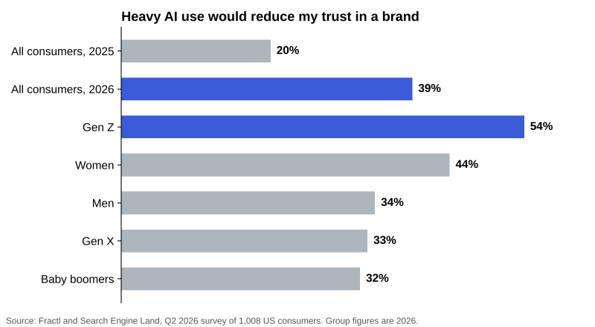
Share of US consumers who say heavy AI use would reduce their trust in a brand. Source: Fractl and Search Engine Land, Q2 2026 (n=1,008).
The UK numbers point the same way. A YouGov poll of 2,014 British adults (February 2026) found 72% would be less likely to read an article partly written by an AI model. Yet only 35% thought they could spot one. Put those together and the lesson is clear enough: readers don’t punish AI they can’t detect. They punish writing that feels machine-made.
What a Humanizer Can and Can’t Change in Claude Text
Two different problems get lumped together here. Separate them before you paste anything.
Style patterns your readers notice
This is the stuff people complain about. Tidy three-part lists, a bold lead-in on every bullet, a closing line that repeats the paragraph you just read. A rewrite tool can loosen these patterns. So can you, and you should do both.
Claude’s statistical watermark
Anthropic’s explainer (August 14, 2026) is unusually frank about this. The mark lives in Claude’s word choices, and the company says “nothing is added to the text and there are no hidden characters.” Light editing probably won’t remove it; a complete rewrite where every word changes will. Detection runs through a private-preview API for regulators, researchers, media and some enterprises, so the rest of us can’t test it.
The consequence is simple. No humanizer, Phrasly included, can prove it cleared Claude’s watermark, and anyone promising that is guessing. What a good tool can do is change the writing so it reads like a person wrote it. That’s the part your readers actually respond to.
Step-by-Step: Humanizing a Claude Draft in Phrasly
Step 1: Give Claude a better starting point
A humanizer works with what you hand it. Feed it a bland draft and you’ll get a smoother bland draft back.
Before you ask for the piece, paste two or three paragraphs of your own writing and tell Claude to match the sentence length and tone. Better still, save it as a custom Style in Claude so you don’t repeat yourself. Ask for no bold lead-ins and no summary sentence at the end of each section. One minute here saves ten later.
Step 2: Copy clean text out of Claude
Claude writes in Markdown. Drop that into a plain field and you’ll see stray asterisks and pound signs everywhere. Paste into Google Docs or Word without formatting (Ctrl+Shift+V), clear out any leftover symbols, then copy again. You want the humanizer working on words, not markup.
Step 3: Lock what must not change
Write a short list before rewriting anything: product names, prices, dates, quotes, statistics, legal wording and target keywords. Rewrite tools paraphrase, and paraphrase is exactly how “up to 30 days” quietly becomes “about a month.”
Phrasly’s guide to AI tools that cut editing time without losing brand voice makes the same point well: decide what can’t move first, then choose the lightest edit that fixes the problem.
Step 4: Pick the mode that fits the job
Open Phrasly’s humanize text tool for Claude and paste your draft. You’ll see three modes, and they aren’t interchangeable.
| Mode | What Phrasly says it does | Best for |
| Easy | Minimal changes, clears obvious formatting issues | Emails, short posts, drafts you’ve already edited |
| Medium | Balances natural flow with watermark removal | Blog posts, reports, client work |
| Aggressive | The most thorough rewrite of the three | Long, stiff drafts where tone matters more than exact wording |
Not sure? Start with Medium. You can always go heavier. Going back is harder, because by the third pass you’ve lost track of what the original said.
Mind the word limits
The free plan handles 2,500 words at a time, 10 times a day. Premium plans raise that to 5,000 words per run with no daily cap. For a long Claude report, split at section breaks instead of mid-paragraph so each chunk keeps its own context. The tool currently works in English, Spanish, French and German.
Step 5: Check the score before and after
Run “Check for AI” on the raw Claude draft first, then on the rewrite. The gap between the two tells you more than either number alone.
If a section still flags, don’t keep feeding the same paragraph back through Aggressive. Read it. Usually one long, over-balanced sentence is doing the damage, and you’ll fix it faster by hand. For a second look, the standalone AI Detector runs on the same account. Treat any score as a hint, though, not a verdict, since no public detector can read Anthropic’s watermark.
Step 6: Compare against your locked list
This is the step most people skip. Put the original and the rewrite side by side and walk through your list from Step 3: every number, every name, every quote. Phrasly’s own page warns that the tool “can make mistakes” and asks you to double-check the output. Take that seriously.
Step 7: Read it out loud once
Your ear catches what a detector won’t. A joke that no longer lands. A sentence that sounds like nobody you’ve ever met. A claim that drifted a little.
Then add one thing only you could have written: an example from your own work, a figure from your own data, an opinion you’d defend. That detail does more for “human” than any rewrite setting ever will.
If you live inside Claude all day
Phrasly also offers an MCP connector that runs the humanizer and detector inside the Claude chat, so you skip the copy and paste. The steps above still apply. Only the place you click changes.
Mistakes That Quietly Undo the Work
- Humanizing before fact-checking. Check Claude’s claims first. A fresh rewrite makes errors harder to spot, not easier.
- Running the text through three tools in a row. Each pass drifts further from what you meant to say.
- Asking Claude to “make it sound more human.” You just get new Claude text. Anthropic says even a translation is watermarked because Claude chose every word, and the same logic applies to a rewrite.
- Treating humanizing as a way around disclosure. It changes how text reads, not what you owe a school, client or publisher. Readers want labels, too: 84% of consumers in the Fractl survey want AI-written content labeled.
Ten Minutes That Make Claude Sound Like You
Claude gives you a fast, competent first draft. What it can’t give you is your voice, your examples or your judgment about what matters to the person reading.
A humanizer closes part of that gap. Start with a better prompt, protect the facts, pick a mode that suits the job, check the result and then read it like a skeptical customer would. Do that, and the second paragraph stops being where readers give up on you. It becomes where they start trusting you.