How to Add Chapters to a Video With AI Markers
Adding Video Chapters With AI Markers: How It Works

To add chapters with AI markers, let an AI tool transcribe your video, mark where each topic starts, then turn those marks into timestamps (starting at 00:00) for your video platform. An AI video editor such as Adobe Firefly handles the transcript and captions step, giving you timecoded text to pull chapter points from.
If you’re trying to decide whether AI features in video editors can be trusted with captions and chapters, here’s the honest version: they do most of the heavy lifting, but not all of it. Captions come out fast and mostly right. Chapter markers are only as good as the transcript underneath them, and they still need a person to check the titles and timing. Below is how the process works, what platforms require before chapters will show up, and where accuracy actually lands.
How Do You Add Chapters With AI Markers?
Chapter markers start with a transcript. The AI converts speech to text, ties every line to a timecode, and then you (or an assistant) pick the moments where the subject changes. Those moments become your chapter start times.
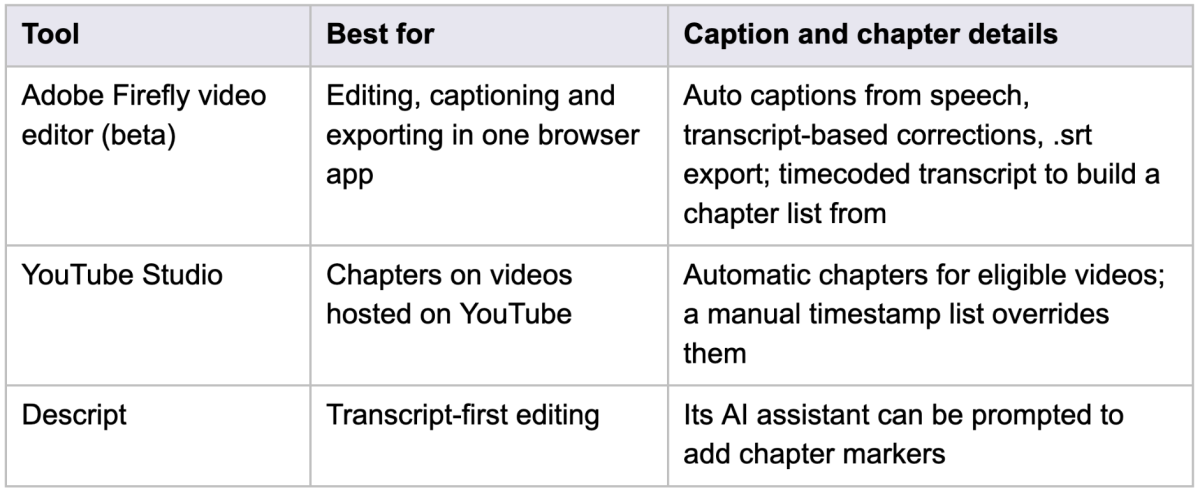
Adobe Firefly covers the transcript side of that job. Its browser-based video editor, currently in beta for desktop Chrome, detects speech and creates synced captions, lets you fix wording by editing the transcript directly, and can export an .srt caption file. Since each transcript line carries a timecode, it’s easy to scan for topic shifts and copy those times into a chapter list. The same transcript also powers text-based editing, which is handy for trimming interviews and podcasts before you mark anything.
A simple workflow looks like this:
- Finish the edit first. Every cut after this point shifts your timecodes.
- Generate the transcript and captions, then correct names, jargon and numbers.
- Mark real topic changes, not every new sentence.
- Write short, specific titles and paste the list into your video description when you upload.
What Are the Requirements for Video Chapters and Automatic Chapters?
On YouTube, chapters are built from a timestamp list in the video description, and the list has to follow three rules. The first timestamp must be 00:00. You need at least three timestamps, listed in ascending order. And each chapter has to run at least 10 seconds. Miss any one of those and the chapters simply won’t appear on the progress bar.
Automatic chapters work differently. YouTube can generate them for you, but creators can opt in or out in YouTube Studio, and not every video qualifies. Even an eligible video may not get them. If you add your own timestamps, they replace the automatic version, which is the more reliable choice when chapter names matter. Other video hosts handle chapters in their own ways, so check each platform’s help pages before you publish there.
How Good Is AI Video Editor Caption Accuracy and Chapter Generation in 2025–2026?
Captions have a clear benchmark. Accessibility guidance based on FCC and DCMP standards sets 99% accuracy as the target, which works out to about 15 errors or fewer in 1,500 words. Machine captions usually fall somewhere between 80% and 95%. Clean audio with a single speaker lands near the top of that range; crosstalk, heavy accents, background music and technical vocabulary pull it down. That’s why a correction pass is part of any serious caption workflow, and why editing captions through the transcript saves real time.
Chapter generation has no published accuracy standard. In practice, AI picks up topic shifts well in structured videos like tutorials, product demos and interviews with clear questions, and struggles with loose, conversational footage. The titles it suggests tend to be generic, so expect to rewrite most of them.
Here’s how a few common options split the work:
Frequently Asked Questions
Are AI-generated chapter titles good enough to publish as is?
Treat them as a first draft. The timing is often close, but titles like “Introduction” or “Discussion” don’t tell viewers much. Swap in the actual topic, such as “Pricing tiers explained,” so people can find the part they came for.
Should captions be burned in or uploaded as an .srt file?
It depends on where the video goes. Burned-in captions suit social feeds where videos often autoplay on mute. A separate .srt file lets viewers turn captions on or off and is easier to fix later. Firefly’s video editor supports both: export the video with styled captions applied, or export the .srt on its own.
Can short videos have chapters?
Only if they’re long enough to meet the rules. With YouTube’s minimum of three chapters at 10 seconds each, a video needs to run at least 30 seconds before chapters are possible, and very short clips usually don’t benefit from them anyway.
Read more: How Can Small Businesses Create Professional Visual Content With AI?
Read more: Got No Video Budget? Here’s How to Use Seedance 2.5 Free for a Weekend Project
Read more: How a UGC Platform Helps Brands Scale Content Without Scaling Their Team