Apple Pay vs Cash App: Which Is Better for Everyday Payments
Smartphone-based wallets have transformed day-to-day transactions. One can order a cup of coffee, purchase groceries, or a dinner bill as easily as pressing a button on a phone or writing a brief text. Apple Pay and Cash App are two of the most used ones. All of them provide different methods of compensating people and merchants. The mobile wallets no longer are a niche tool. According to industry estimates, Apple Pay represents more than 90 percent of all mobile wallet payments in the United States, and worldwide mobile wallet payments are expected to surpass more than 1.5 trillion dollars every year by 2026. On the other hand, Cash App earned over 14 billion dollars in 2023 in its transaction service and Bitcoin trading. Digital wallets are rapidly becoming a norm and not an exception as more than 60 percent of retailers in the United States currently accept contactless payments.
As digital wallets become more mainstream, they are also increasingly used on regulated gaming platforms. Many reputable online casinos now support fast mobile wallet deposits, allowing users to fund accounts without manually entering card details. This shift highlights how everyday payment tools are expanding into entertainment sectors as well.
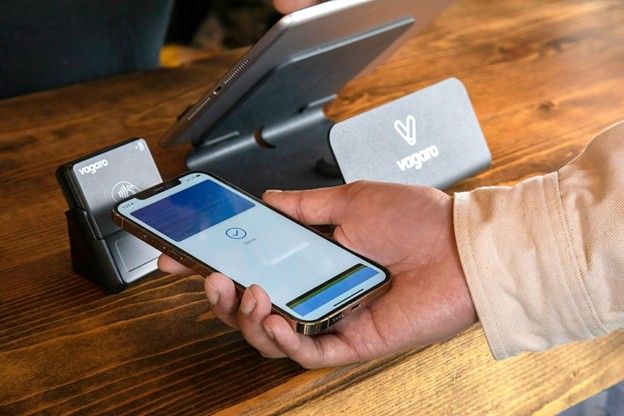
What Is Apple Pay?
Apple Pay is a mobile payment platform built into iPhones, iPads, and Apple Watches. It lets users pay at checkout terminals by holding their device near a contactless reader. Under the hood, Apple Pay uses NFC (near-field communication) and secure tokenization. This means the user’s actual card numbers are never shared with the merchant. Instead, a digital token (a unique code) is used to complete the transaction. Biometric security is standard: to pay, the user authenticates with Face ID, Touch ID, or a secure passcode.
Apple Pay is tied to Apple’s Wallet app. Users add a credit or debit card into Wallet once, and after that they can pay with a quick tap. No extra app download is needed if you have a compatible iPhone or Apple Watch. The system is widely accepted at stores worldwide. In fact, Apple reported that in 2025 purchases using Apple Pay generated over $100 billion in merchant sales globally. The service launched in 2014 and has since expanded rapidly. By early 2026 it was available in 89 countries and regions.
Apple Pay in Everyday Life
Most major retail stores, restaurants, and ticketing systems accept Apple Pay. Anywhere the store has a contactless payment terminal (NFC), Apple Pay usually works. If you already have an iPhone or Apple Watch, it simply turns the device into a tap-to-pay card. People often find it handy for small purchases like transit tickets, coffee, or at convenience stores, because it is fast and you never have to fish out a wallet. Apple Pay also works for peer transfers. In iMessage chat, you can send money to contacts if both parties have Apple Cash set up. (Note that Apple Cash is a specific iMessage feature for P2P, which uses Apple Pay technology underneath, but it requires an extra setup.)
Beyond retail, Apple Pay is making inroads in other sectors such as gambling. Online casinos now accept Apple Pay for instant deposits. Apple Pay has become a common payment method at online casinos, allowing players to add funds without sharing card numbers.
What Is Cash App?
Cash App is a mobile payment service by Block, Inc. (formerly Square). It started mainly as a peer-to-peer payment app, similar to PayPal’s Venmo or Zelle. Users sign up with a phone number or email and link a bank account or debit card. They can then send money to friends instantly in the app with a username (a “$Cashtag”) or QR code. Cash App is especially known for its “Cash Card,” which is a free Visa debit card linked to your Cash App balance.
Beyond P2P transfers, Cash App has expanded features. Users can invest spare change in stocks or buy/sell Bitcoin directly in the app. It also offers direct deposit of paychecks. However, for everyday spending at merchants, the key is the Cash Card. This debit card (in Visa form) can be added to Apple Pay or Google Pay, or used at a terminal like any Visa card. In effect, Cash App becomes a full digital wallet with the card feature.
Cash App Features and Usage
Cash App is popular in the U.S. (and now the UK). It had about 50.7 million users in 2024, representing roughly one of every six Americans, and it’s projected to grow to about 54.9 million by 2025. Its user base skews young: nearly half of Cash App’s users are aged 25–44. This means many everyday consumers already use it to split bills or pay friends. In fact, the app’s own data show heavy real-life spending: in 2023, 22% of Cash Card transactions were at big-box stores, 19% at restaurants, and 15% at other retailers. People are not just sending money to friends, they use Cash App’s debit card at supermarkets, fast food, and retail outlets.
Cash App works on both iOS and Android, making it widely accessible. Setting it up involves verifying identity (especially to raise limits), then linking a bank account or card. Sending money to someone costs nothing if you use a linked bank or debit card. It can even support businesses for payments (though business accounts pay a processing fee).
Like Apple Pay, Cash App claims robust security. Users can lock the app, enable PIN entry or biometric unlock, and all transfers are encrypted. Still, it is often viewed as a standard online payment app rather than a dedicated tap-to-pay system. The Cash Card bridges that gap by functioning like a physical debit card. So if a store accepts Visa, it accepts your Cash App balance.
Cash App in Everyday Life
For day-to-day use, Cash App shines in peer transfers. Need to reimburse a friend? You enter their $Cashtag and send cash. Splitting a dinner bill is a snap. When it comes to paying merchants directly, users rely on the Cash Card. This means if you want to buy coffee or groceries, you either use the Cash Card at checkout or add the Cash Card to Apple Pay/Google Pay. It is not as “built-in” as Apple Pay, but it is flexible.
Cash App also has some fees to keep in mind. Sending money from a bank account or debit card is free. However, if you fund a payment with a credit card, Cash App adds a 3% fee. Withdrawing money to your bank account can be done as a free standard transfer, but an instant deposit (to a linked debit card) costs a small fee (about 0.5–1.75% of the amount). That means if you want funds immediately, Cash App charges for that speed. Standard deposits take 1–3 business days but are free. These fees are worth noting for everyday budgeting, though in casual peer-payments they rarely matter.
Key Differences: Apple Pay vs Cash App
Device Compatibility
Apple Pay only runs on Apple devices. You need an iPhone (model 6 or newer), Apple Watch, iPad, or Mac to use it. Cash App runs on both iOS and Android (plus desktop web). If you are an Android user or even a Windows user, Apple Pay is out of the question. Conversely, only iPhone users can add cards to Apple Wallet. So availability is opposite: Apple Pay is exclusive but Apple’s user base is large, whereas Cash App is inclusive across phones but has a smaller reach overall.
Apple Pay’s rollout is global: by 2026 it reached 89 countries. Cash App, however, is limited to the U.S. and UK. For someone traveling internationally, Apple Pay will work in most places; Cash App generally will not (except where UK/US cards work). For daily use in the home market, Cash App’s broad OS support might be more important.
Security and Privacy
Both aim to be secure, but they do it differently. Apple Pay’s tokenization means merchants never see real card numbers. If a merchant’s system is hacked, your card data remain safe. Apple also uses biometric checks. Cash App does encryption and lets users lock the app or card. It also stores user data, but it is similar to a bank app in security. One key point: Cash App links to your bank and identity, so it may have more visibility into your spending. Apple Pay is mostly a pass-through that doesn’t track your purchases (Apple says it does not store transaction data that can identify the user).
Merchant Acceptance
This is a big one. Apple Pay is accepted almost everywhere that supports contactless Visa/Mastercard payments. You see the Apple Pay logo at millions of stores, gas stations, cafes, etc. In practice, if a merchant takes tap payments, it probably works. Our earlier stat of $100B in Apple Pay sales shows that level of acceptance. Cash App by itself (as just the app) isn’t listed by retailers. Instead, users pay with the Cash Card. That means any merchant taking a Visa card will take a Cash Card, but stores won’t advertise “we take Cash App.”
But casino sites and sportsbooks often advertise Apple Pay as an option. Some major U.S. casinos generally do not list Cash App directly. Instead, players use the Cash App Visa card to deposit if they must. Meanwhile many casinos proudly mention Apple Pay as a deposit option. In practice, Apple Pay has the edge in merchant support.
Speed and Convenience
Both wallets are fast. Tapping a phone or sending a message happens in seconds. Apple Pay can feel a bit quicker for the user because it’s one motion at the register. Cash App requires either tapping your Cash Card or opening the app to send money. For on-the-spot in-store payment, Apple Pay’s tap may edge out swiping a debit card. In peer transfers (sending to friends), Cash App is streamlined: enter a name or scan code, send. Apple Pay’s equivalent peer feature (Apple Cash) is only on iMessage between Apple devices.
Fees and Costs
Apple Pay has no user fees. There is never an extra charge for using Apple Pay itself. The user only pays whatever their bank or card would charge. Cash App is free for most personal transfers and standard bank deposits. Its fees appear when using credit funding or instant withdrawals. Thus for most daily uses (coffee, groceries), neither Apple Pay nor Cash App adds fees. But Cash App has more fee gotchas if you want to move money quickly or use a credit card.
Availability of Funds
Apple Pay is simply an interface to your existing cards or accounts. You can only spend what’s on your linked cards or bank. Cash App includes an internal balance. People can receive money into their Cash App account from others and spend it. This can feel a bit like using a prepaid debit. If you don’t tie a bank, you must first load money into Cash App. Apple Pay has no separate balance. So the workflows differ: Cash App can act as a mini-wallet with its own balance. Apple Pay is more like a pass-through.
Everyday Payment Scenarios
In-Store Purchases
At a store checkout, Apple Pay shines. You simply hold your iPhone or Apple Watch to the contactless terminal. If the clerk says “card or mobile?” you pick mobile and tap. The cashier sees a payment approved almost instantly. No cash needed, no PIN on your phone. Apple Pay works at grocery stores, fashion shops, restaurants, gas pumps, virtually all major retailers. For example, supermarkets and coffee shops widely display the Apple Pay icon.
Cash App’s approach is: use the Cash Card. You tap the physical card or put it on file in Apple Wallet or Google Pay. It works just like any debit card. However, it adds a step. If you forget your Cash Card, you can’t tap the phone via Apple Pay (unless you manually add the Cash Card into Apple Wallet and select it). In day-to-day terms, that means Apple users paying at stores will often prefer Apple Pay over remembering to swipe a plastic card.
It’s worth noting that neither wallet requires cash, everything is digital. People are indeed using it at supermarkets and diners. Either wallet (or card) works for a quick sandwich or tube ticket. But Apple Pay offers a slight edge in speed and ease for iPhone owners, since they can simply tap without pulling any card out.
Paying at Fun Spots (Gaming, Entertainment, Casinos)
Digital wallets are no longer limited to coffee shops and supermarkets. The same payment tools people use for groceries or streaming subscriptions are now widely accepted across entertainment platforms, including regulated online casinos and sports betting sites. As gaming platforms prioritize fast checkout and mobile-first design, payment speed and security have become just as important as bonuses or game selection.
Apple Pay has gained visibility in this space because it allows instant deposits through biometric confirmation. Instead of typing card numbers manually, users can approve a transaction with Face ID or Touch ID, making the process similar to paying at a retail store. Many regulated casinos integrate Apple Pay directly into their cashier systems, allowing players to fund accounts quickly while keeping card details encrypted through tokenization.
Cash App users typically rely on the Cash Card when depositing on gaming platforms. Since the Cash Card functions as a standard Visa debit card, it works wherever Visa is accepted. However, it usually requires manual card entry unless already saved in a wallet. While the process is still straightforward, it lacks the native biometric confirmation that Apple Pay provides during checkout.
Payment infrastructure across regulated casinos follows broadly similar technical standards. At Kwikky, deposits are routed through established card networks and mobile wallet gateways, meaning transactions rely on standard encryption, authentication, and issuer approval processes rather than alternative or proprietary payment mechanisms. This reflects how most licensed gambling sites structure their cashier systems in line with wider digital commerce practices.
In practical terms, both Apple Pay and Cash App can support casino deposits where available. The distinction lies in how each method connects to the site’s cashier flow. Apple Pay is often embedded directly into mobile checkout interfaces, whereas Cash App operates through its linked debit card structure. The choice ultimately depends on how users prefer to manage authentication, stored balances, and transaction approvals within their broader digital payment setup.
Online and In-App Payments
Online shopping is another victory for Apple Pay. On websites and in apps, you can often click an “Apple Pay” button. It fills in your shipping and payment info instantly via your device, then asks for Face/Touch ID to confirm. It’s faster than typing a card number. This convenience can speed up routine buys like groceries online or digital subscriptions.
Cash App itself doesn’t plug into most online stores. You cannot log in with Cash App to pay on a retail website (outside of Cash Card). Instead, you could use the Cash Card in Apple Pay or Google Pay for online purchases if that fits your strategy. But overall, Apple Pay has more native integrations for e-commerce.
For recurring bills (utilities, subscriptions), both wallets have indirect roles. Apple Pay may authorize a one-time payment, but recurring bills usually go through card or bank apps. Cash App doesn’t handle most bills directly unless you pay via Cash Card on autopay.
Person-to-Person Transfers
This is where Cash App truly excels. Splitting a dinner or paying rent is easy with Cash App. It was built for send money to friends. Apple Pay also does peer transfers via Apple Cash, but only within iMessage chats between two people on Apple devices. Cash App works cross-platform and with anyone on Cash App. If a friend doesn’t have an iPhone, Apple Pay can’t send them money via Apple Cash. Cash App can send to any verified user, even on Android.
So, in daily life, if you often split taxi fare or pay friends back for lunch, Cash App is more straightforward. Apple Pay’s peer function is limited and mainly useful if everyone in the group has iPhones.