A Main Street Facebook plan for the holiday season
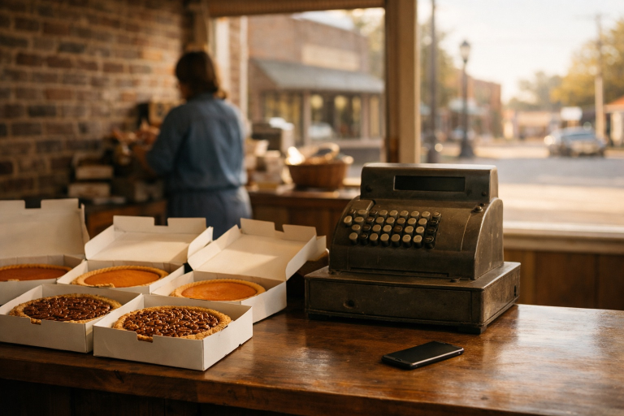
The day before Thanksgiving, a pie order list is taped to the register at a hypothetical family bakery downtown. The phone keeps buzzing with Facebook messages. One customer asks whether there’s an extra pecan pie. Another needs the pickup deadline. Someone has shared yesterday’s photo in a neighborhood group, and a new customer wants to know where to park.
For a shop in a town like Clinton, those questions help explain why Facebook remains part of the workday. Customers already gather there to discuss church activities and Friday night football. During the holiday rush, a business Page gives them a familiar place to check before heading out.
Why Facebook still matters in a small town
A recommendation in a church group can introduce a shop to people who have never visited. Parents trade suggestions for holiday gifts. Grandparents share open house announcements with family. A useful business post gives those conversations something specific to pass along.
The Page also works as a reference desk. Someone who hears about a boutique from a neighbor may check its Facebook Page before making the trip. An old holiday schedule can leave that person wondering whether the door will be open.
Check the Page’s phone number and street address, then look at it as a visitor would. Can someone find the current hours without scrolling through weeks of posts? If the schedule changes for a holiday, update the Page information and publish the change in a fresh post.
Reviews and recommendations need attention, too. Thank customers who leave them. If someone describes a problem, acknowledge the concern and offer a way to discuss the details privately.
Posts neighbors actually stop for
The most useful holiday photo may be the one taken beside the front window before opening. Show what is actually available that day. At the example bakery, that could mean the pies remaining after preorders are filled. A hypothetical boutique might photograph the sweater customers keep asking about, with available sizes in the caption.
A phone photo taken in daylight is enough. Clear away distracting clutter and check that the color looks close to what customers will see in the store. Update the caption or add a prominent comment when an item sells out.
Put hours and holiday closures in the post text, even if they also appear on a graphic. Include pickup instructions when they apply. Someone sharing the post into a local group should not have to supply the missing details.
For example, a hardware store could photograph the faucet covers it has on hand before a cold weekend. A lawn care business could post its last available appointment dates before Thanksgiving. The information gives customers a reason to stop scrolling.
Check the audience before publishing. Where a post audience selector appears, choose Public for business announcements. Pay particular attention when sharing from an owner’s personal account, where a limited audience setting can prevent customers from passing the post along.
Events and Marketplace for the holiday weeks
A Facebook Event gives a holiday open house or craft fair a place to collect the details. Include the full address and start and end times. Explain what visitors can expect, along with any parking or accessibility information they may need.
If weather changes the plans, update both the Event and the business Page. Someone may have saved the original announcement without following the Event.
A Christmas parade can change when customers plan to shop. If a nearby store adjusts its hours that day, post the exact schedule. Make clear whether customers can stop in before or after the parade, without implying an official connection unless one exists.
Marketplace can help with eligible physical goods offered for local pickup, provided the account and listing meet Facebook’s rules. Use a current photo and describe the item’s condition accurately. Give a general pickup area, then arrange the exact handoff privately. Avoid posting a private home address. Service businesses should keep service promotions on their Pages instead of assuming Marketplace accepts every kind of listing.
The comment section is customer service
A question under a photo may come from someone deciding whether to leave home. Answer comments the same day whenever possible. A clear response about remaining stock or closing time can save a customer an unnecessary trip.
Give someone responsibility for checking messages during business hours. At a small shop, that might mean checking before opening and again after the lunch rush. Choose times that fit the work at the counter.
Keep general answers public. If several customers ask about Thanksgiving pickup hours, answer in the comments and add those hours to the post itself. Move order details and personal information into a private conversation.
Ask happy customers to tag the shop when they share a purchase or photos from a holiday visit. Keep the request friendly and optional. Get permission before reusing a customer’s photo, especially one that includes children.
A quiet word about likes
Plenty of shops are decades older than their Facebook Page. When the Page finally goes up, its first posts can sit at a handful of reactions while half the town already knows the owner by name. A few owners add a modest number of Facebook likes from Hypenza to one public post, usually the holiday hours announcement, using only the post link and no password. It makes the post look less abandoned. The likes that count are still the ones from people who come through the door.
Visible reactions cannot answer a customer’s question or fix outdated hours. Give more attention to whether people can find what they need and get a useful response.
Before the busy week, schedule posts with details that are already settled. A holiday closure notice or open house reminder can be ready ahead of time. Save stock updates for the day someone can check the shelves.
For Small Business Saturday, the day after Black Friday, make a plan before locking up for Thanksgiving. Confirm Saturday’s hours and schedule an opening announcement with a daylight photo of something customers will find in the shop. Assign someone to check comments that morning. Once the doors open, update the post if stock or pickup arrangements change. A neighbor who shares it should be passing along information the next customer can count on.